
1. Getting started
Edify brings together a Bible reader, study tools in the original languages, a reference library, Study Plans, daily devotionals, a study journal and Scripture memory. Everything is connected: from a verse you can open its original words, commentary, cross-references and Library articles, then write about it or learn it by heart.
Download the study data once
The study tools and the Library work offline after a one-time download:
- Open Settings (the gear at the top of the Home tab) and tap Study Pack. This holds the original Hebrew, Aramaic and Greek text, the lexicons, the cross-references and the commentaries. Download it on Wi-Fi if you can.
- Back in Settings, tap Library and download it (about 5 MB). It holds the topics, Bible dictionaries, people, places and book introductions.
- When a newer version is available, the same pages offer an update, which downloads only what changed.
Some tools and some extra content are part of Edify Premium. The app tells you when something needs it. New accounts get 14 days of Premium free.
2. Reading the Bible
Open the Bible tab, choose a book and chapter, and read. You can change the translation from the reader and download translations for offline reading.
- Tap a verse to open the study panel for it (see the next section). The panel also holds the verse actions: highlight colours, Copy, Share, Image (a shareable verse picture), Compare (the verse in other translations), Note, Journal, Memorize and Ask AI.
- Long-press a verse to select several verses at once, then highlight, copy or share them together.
- Your highlights and notes are listed under Settings → Highlights and Settings → Notes.
- Prefer to listen? Each chapter can be played as audio, and Study Plan days have a Listen button.
3. The study panel
Tap any verse in the reader. On a phone the study panel slides up from the bottom (drag it higher for more room). On a tablet it opens beside the text, so you can read and study at the same time. Tap another verse and the panel follows it.
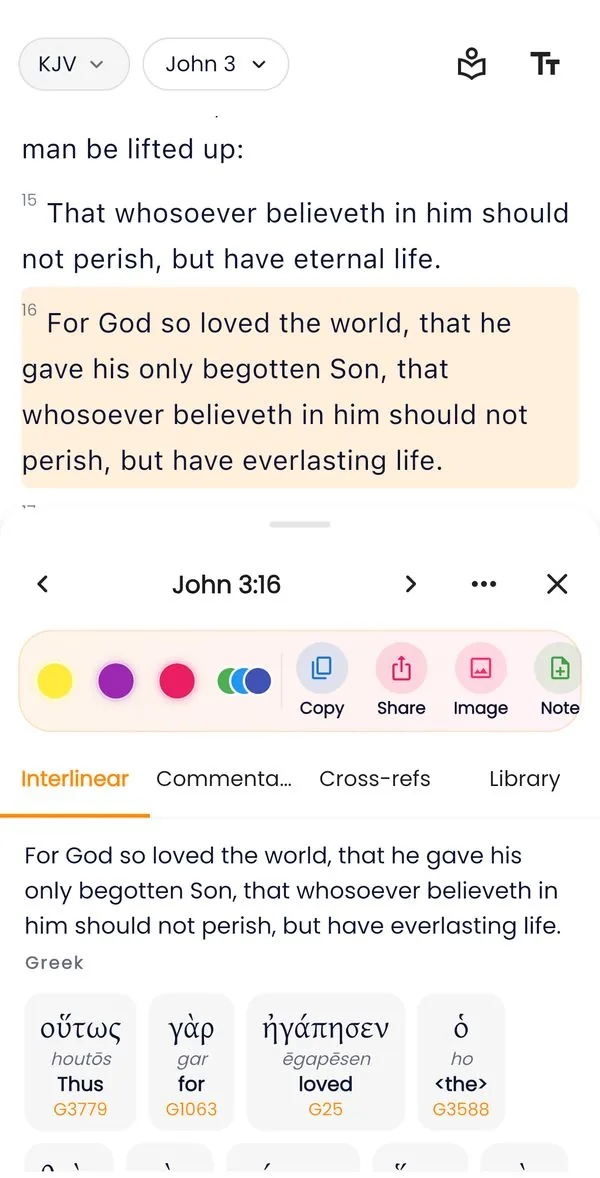
Interlinear
The verse word by word in the original language (Hebrew or Aramaic for the Old Testament, Greek for the New) with a transliteration, the dictionary form, the Strong’s number, the grammar and a short English meaning. Tap a word to study it.
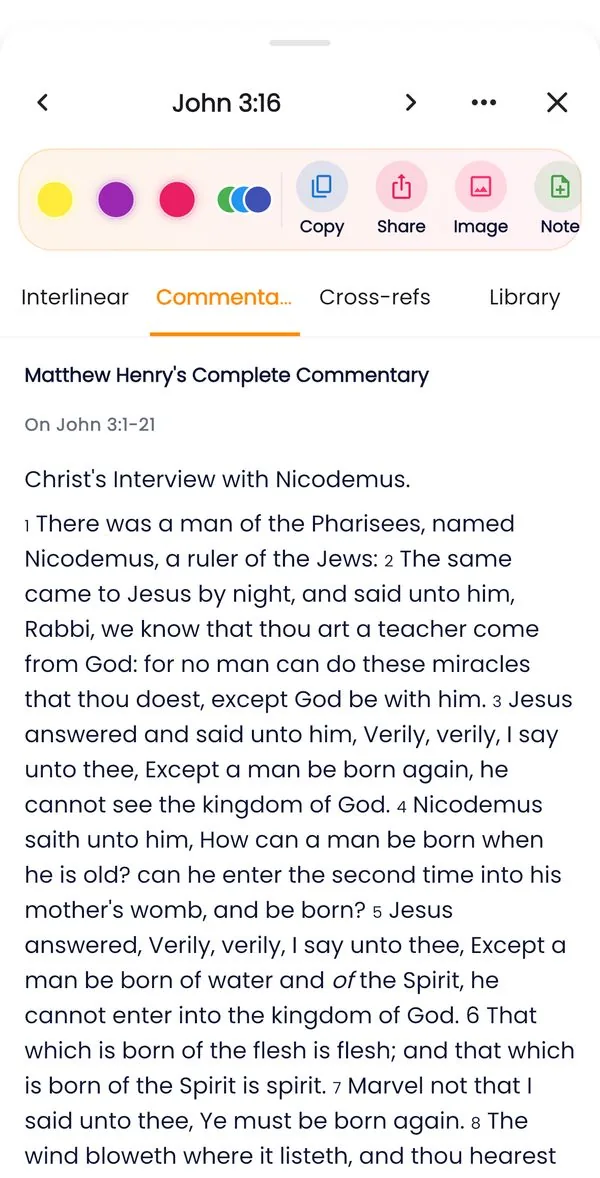
Commentary
What classic commentators wrote on the verse: Matthew Henry, and with Premium also Jamieson, Fausset & Brown, Albert Barnes and Adam Clarke. Read two or three and compare.
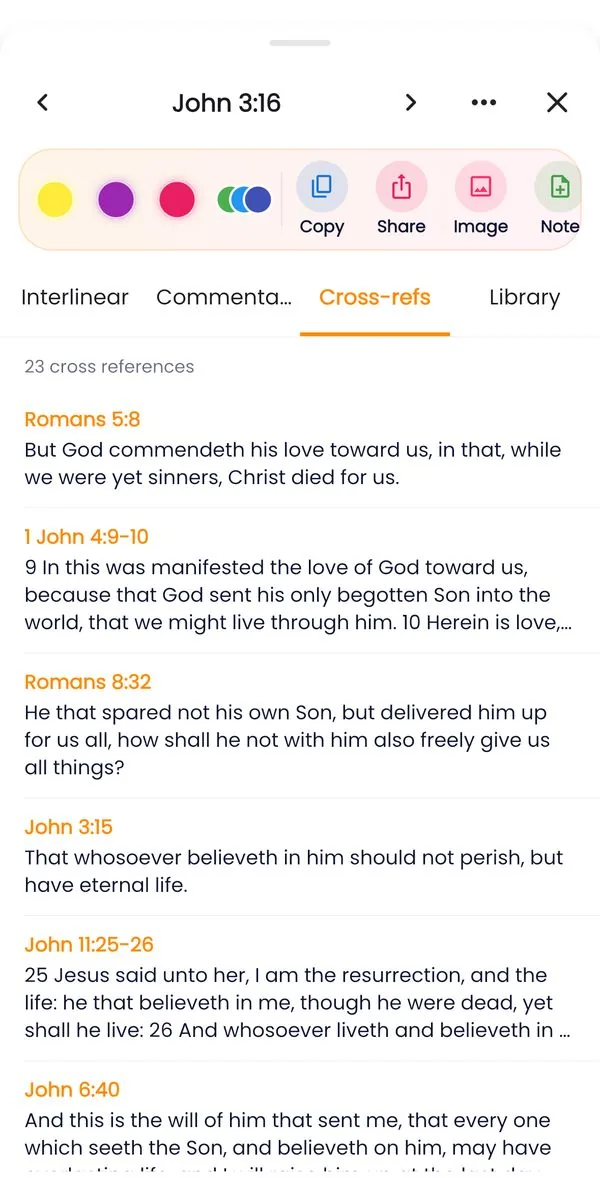
Cross-refs
Other passages on the same subject, ranked by how often readers connect them. Tap one to go to it in the reader; its own study panel opens there, so you can follow the thread as far as it helps.
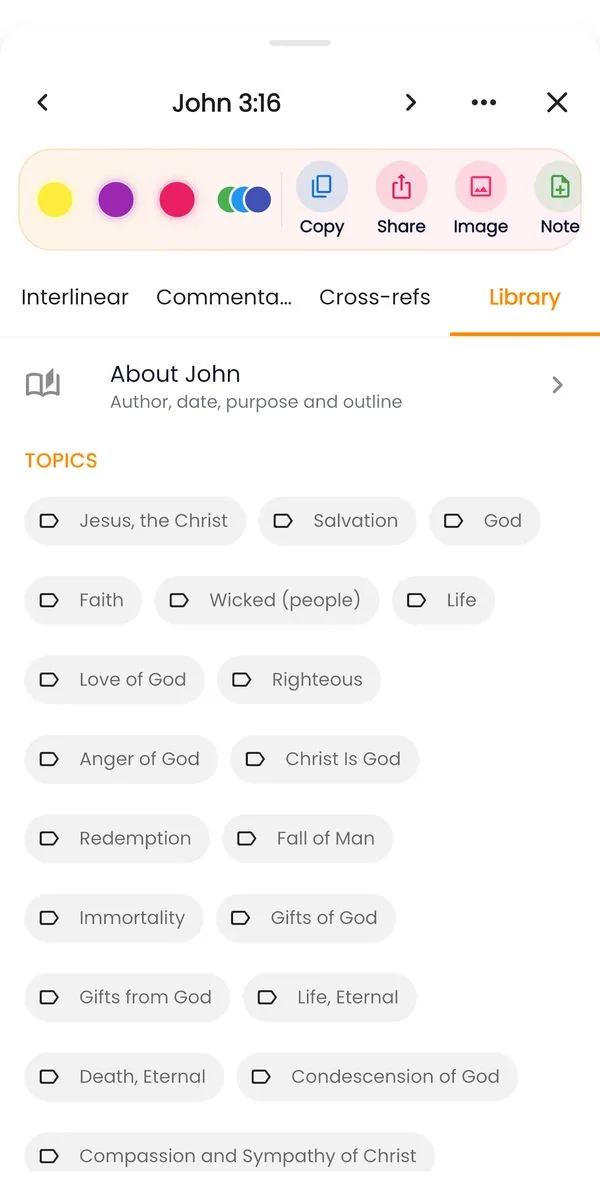
Library
The topics, people and places that this verse is about. Tap one to open its Library article.
4. Word study
Many insights come from the words the writers chose. In the Interlinear tab, tap a word to see:
- Lexicon: the full dictionary entry for the word, with its range of meanings.
- Grammar: the form in plain words, such as a verb’s tense and voice or a noun’s case and number.
- Concordance: every verse that uses the same original word, and how many times it appears. Reading these verses shows how the Bible itself uses the word.
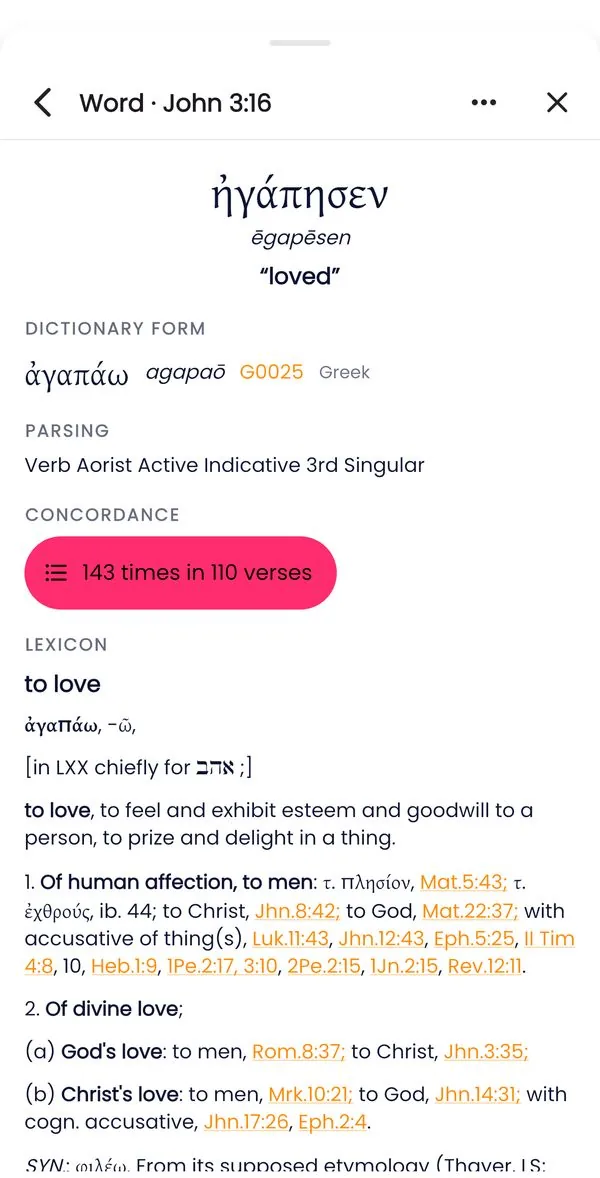
For example, “love” in John 3:16 is agapaō. The concordance shows it across the New Testament, so you can see what kind of love it describes.
5. The Library
The Library is a reference shelf you can use offline. Open it from the Bible Study tab, from Settings → Library, or from the Library tab of the study panel.
| Section | What you find | Sources |
|---|---|---|
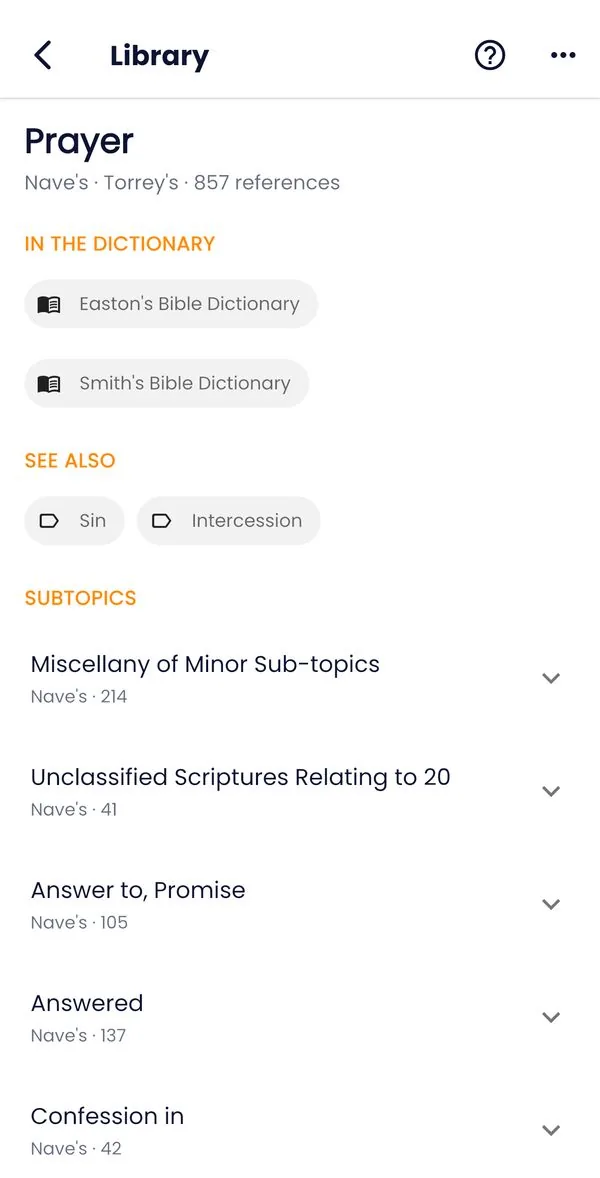
| Topics | Thousands of subjects (Prayer, Faith, Forgiveness…) with every verse on them, grouped into subtopics | Nave’s Topical Bible, Torrey’s Topical Textbook |
| Dictionary | Articles on words, customs, objects and ideas in the Bible | Easton’s and Smith’s Bible Dictionaries, Hitchcock’s Bible Names |
| People | Who they were, what their name means, and the key passages about them. People who share a name are listed separately | Easton, Hitchcock |
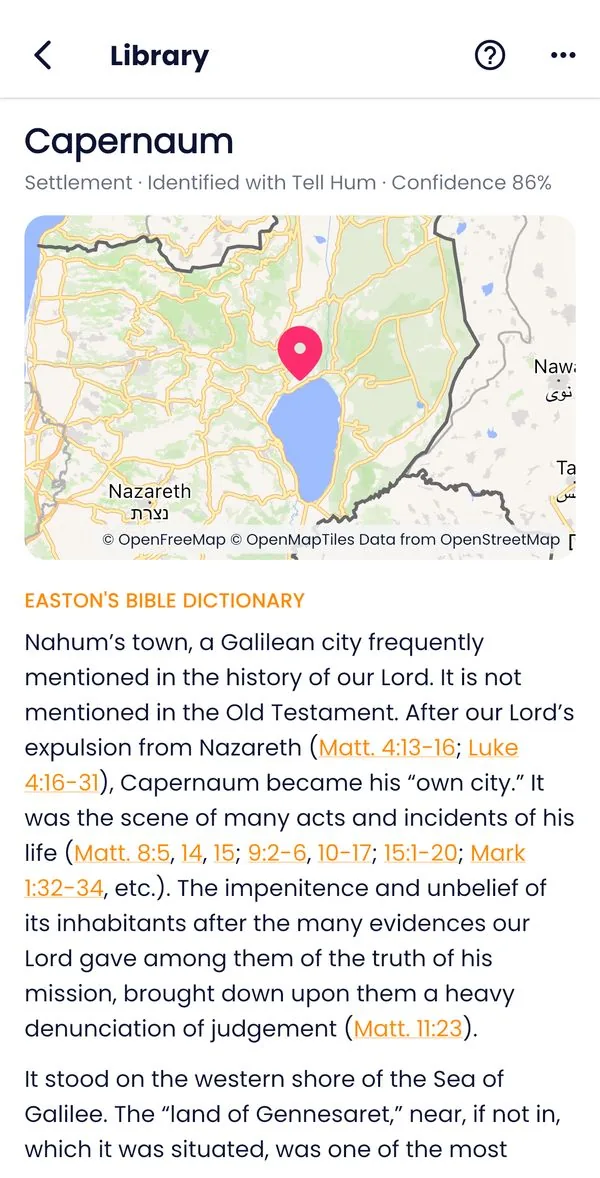
| Places | Where a place was, shown on a map, with the verses that mention it | OpenBible.info geocoding data |
| Books | An introduction to each of the 66 books | Easton |
Use the search box to search everything at once: type “Capernaum”, “covenant” or “Romans”. Scripture references in the articles are links, and a topic’s verses can go straight into your journal. Pages about a topic, person or book also show the Study Plans that go deeper into it.
6. Study Plans
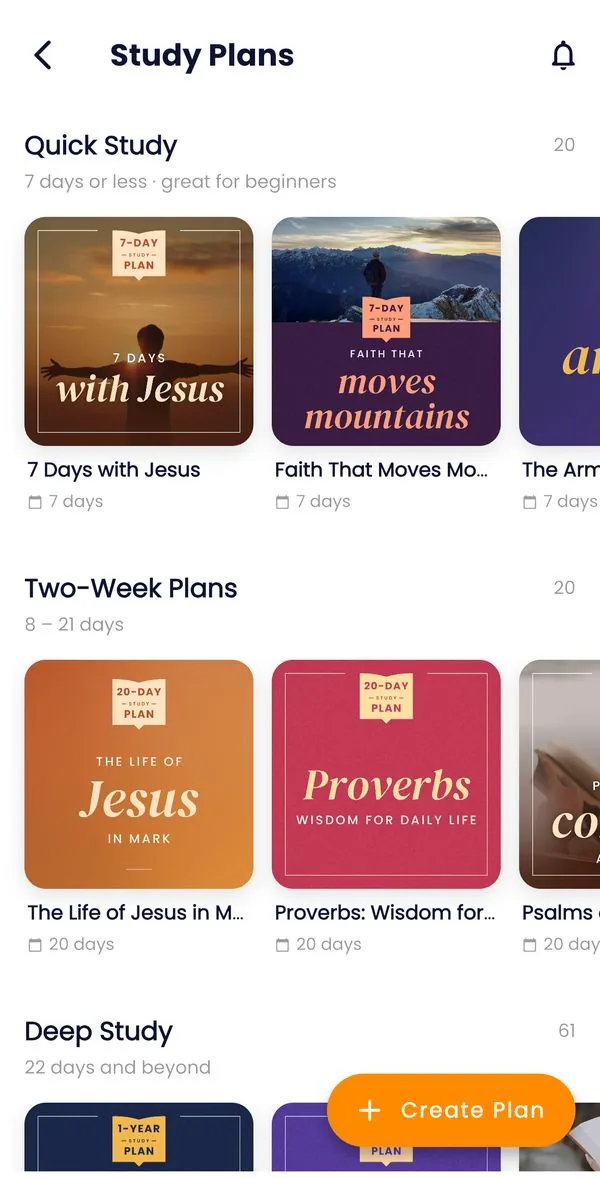
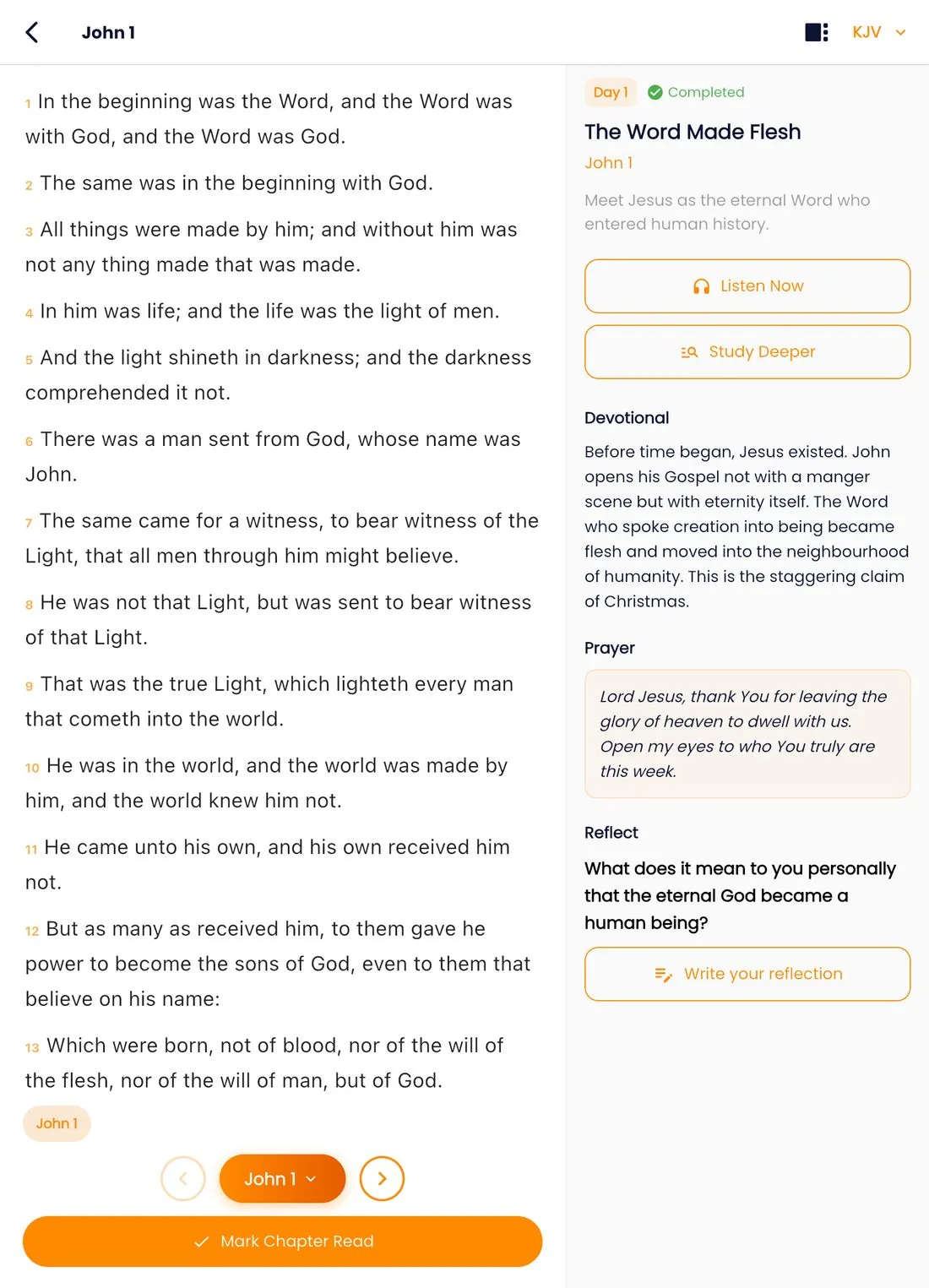
The Study Plans tab lists plans by length and theme. You can also filter by type: Topical, Character studies or Book studies. Open a plan to see its days, then tap Start. Sign in first so your progress is saved.
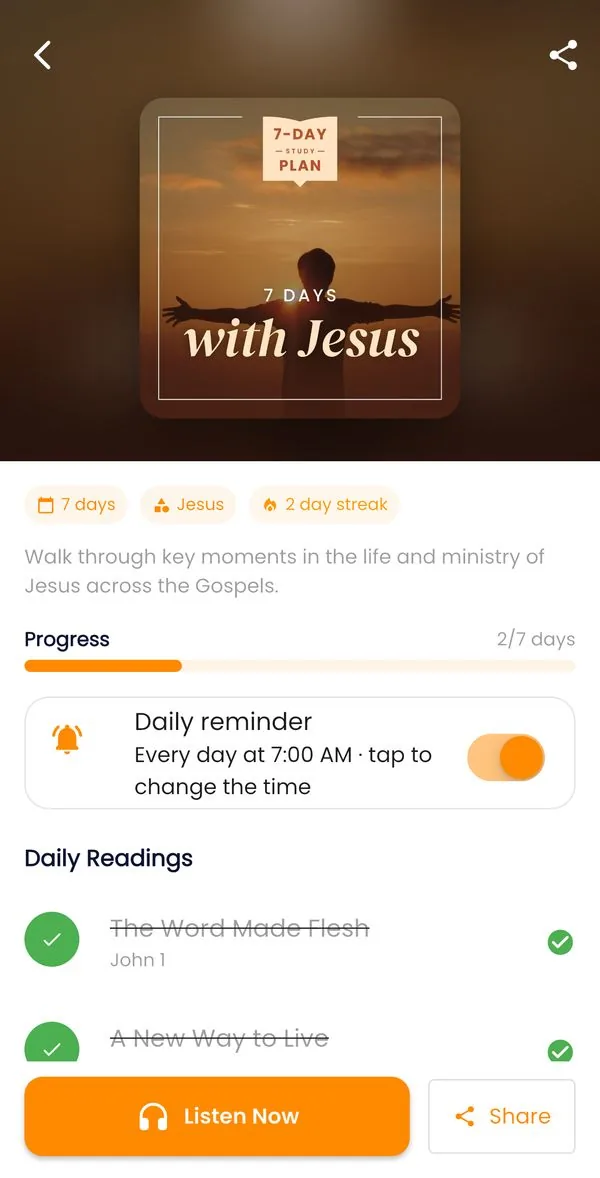
Each day
- Read Now opens the day’s passages. Listen Now plays them.
- Study Deeper opens the reading with the study panel already on the day’s key verse.
- The day may have a short devotional, a prayer and a reflection question. Reflect opens the journal with the question ready, so you can write your answer.
- The key verse can be added to Scripture Memory with one tap.
- Mark Done when you have finished. Your streak counts the days in a row.
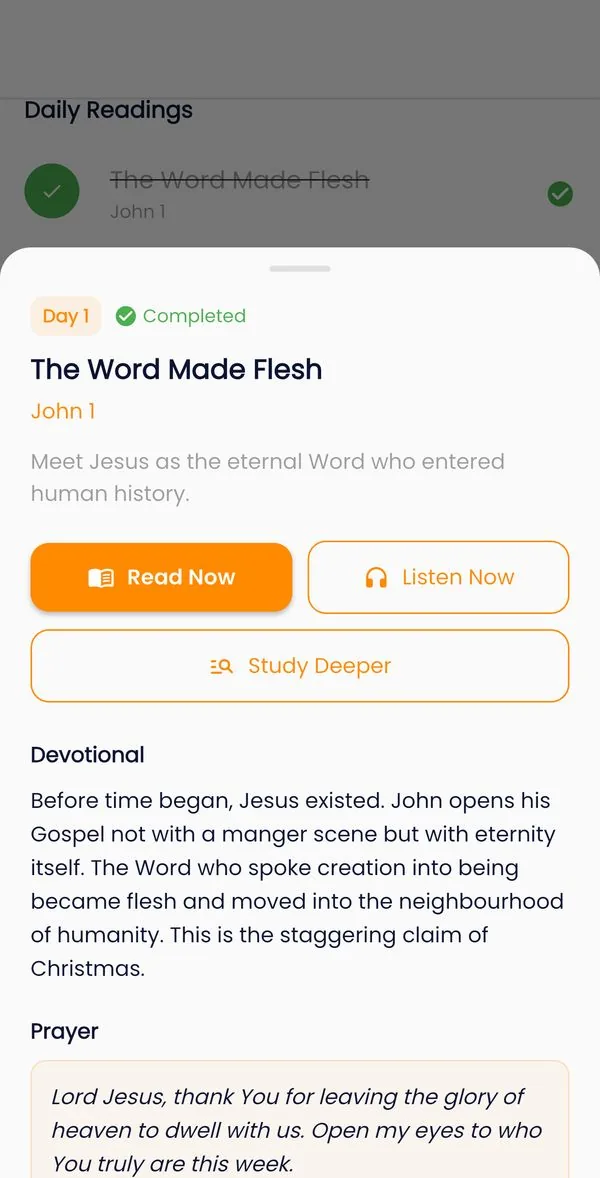
Daily reminder
When you start a plan, Edify reminds you every day at 7:00 to read that day’s passages. Tapping the reminder opens them. To change the time or turn it off, use Daily reminder on the plan’s page. The reminder follows your phone’s time zone, so it still comes at the right time when you travel.
Your own plans
Tap Create Plan to build a plan from any passages, for yourself or for a group that is reading together.
7. Devotionals
Classic daily readings, such as Spurgeon’s Morning and Evening and Daily Light on the Daily Path, are on the Home tab each day. Open one to read it and tap its Scripture references. Tap Journal to write a response.
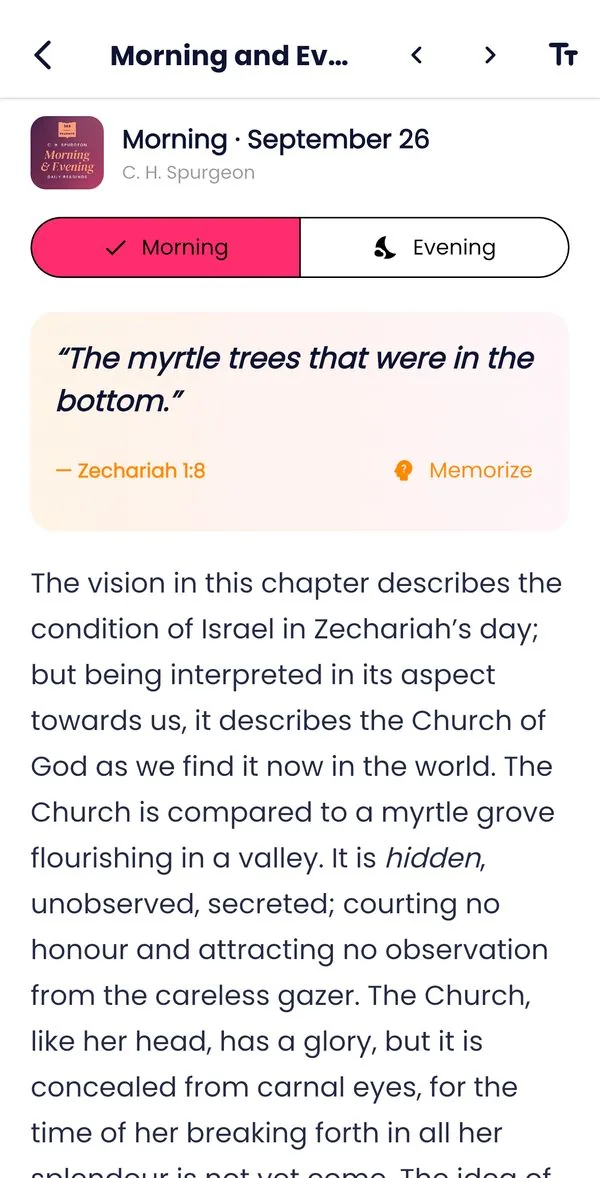
A daily devotional notification is on by default. To change its time or turn it off, go to Settings → Daily devotional. An evening reminder can also be turned on in the Devotionals screen.
8. Study Journal
Writing is how study turns into understanding. Start an entry from a verse (Journal in the study panel), from a plan day (Reflect), from a devotional, or from the Bible Study tab. Entries are linked to their passage, and a small marker in the reader shows verses you have written about.
SOAP
Scripture: copy the verse. Observation: what do you see? Application: what will you do? Prayer: pray it back to God.
Inductive
Observe: what does it say? Interpret: what does it mean? Apply: how does it change me?
Free-form
Open notes for anything else: sermon notes, questions, prayers.
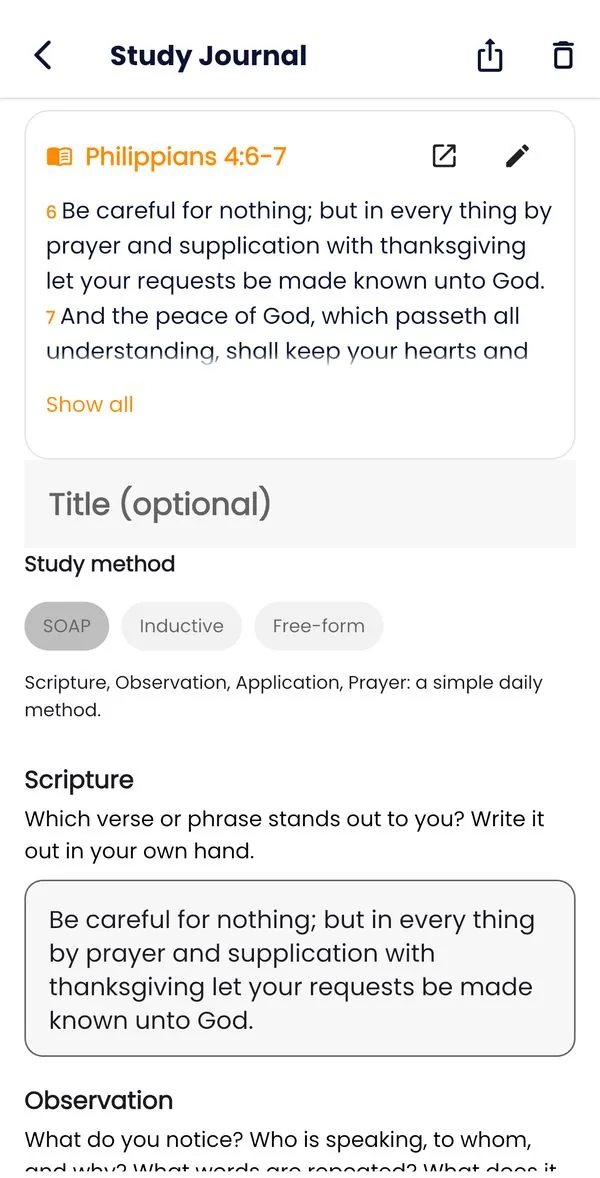
Search your journal to find what you learned on a subject months ago.
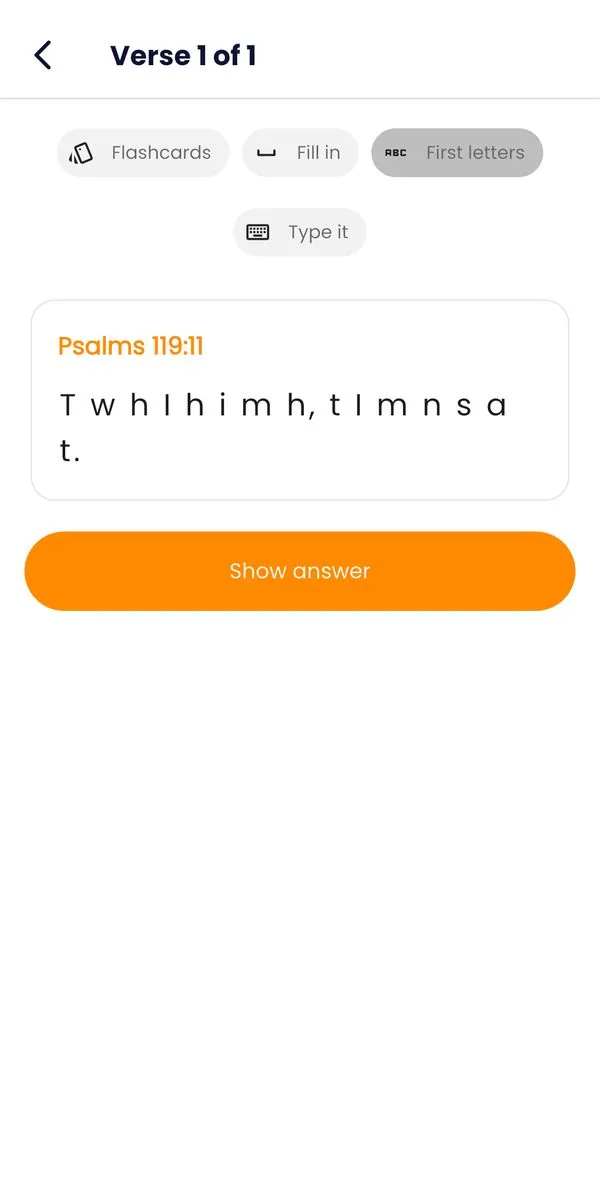
9. Scripture Memory
Add a verse with Memorize in the study panel, from a plan’s key verse, or add a whole memory pack (for example Salvation or Fear and anxiety) from the Library. Open it from the Bible Study tab to practise.
- Flashcards: see the reference and say the verse, then check.
- Fill in: fill in the missing words.
- First letters: recall the verse from the first letter of each word.
- Type it: type the whole verse.
After each try, say how well you knew it. Edify uses spaced repetition: verses you find hard come back soon, and verses you know well come back less often, until they are mastered. A daily reminder tells you when verses are ready for review. The verse is shown in the translation you read, so you learn it in the words you know.
10. Study methods, step by step
Choose a method that fits your time and question. Each one uses the tools above.
Inductive study: observe, interpret, apply
Best for one passage, for example a paragraph of Philippians 4.
- Pray, then read the passage twice. Once slowly, and once aloud or with Listen.
- Observe. Start a journal entry with the Inductive template. Write down who, what, where, when and why. Note repeated words, commands, promises, contrasts (“but”) and conclusions (“therefore”).
- Look at the words. Tap the key verse, open Interlinear, and tap the words that matter. Read the lexicon entry, and scan the concordance for other places the word is used.
- Interpret. Read the verses around the passage. Open Cross-refs to let Scripture explain Scripture. Read the book’s introduction in the Library for its author, audience and purpose. Only then compare with a Commentary.
- Apply. Write one specific, honest step, such as “This week I will…”, and pray about it.
- Remember. Add the verse that stood out to Scripture Memory.
SOAP, for a daily quiet time
- Read today’s plan day or devotional.
- Tap the verse that speaks to you, then Journal, and choose SOAP. The entry is linked to the verse and shows its text, so you can copy the words that matter into Scripture.
- Write what you observe, how it applies to today, and a short prayer. Ten minutes is enough.
Topical study, for example “prayer”
- In the Library, search for the topic and open it. Look at how its subtopics divide the subject.
- Read the verses under two or three subtopics. Tap them to read each one in context.
- Start a Free-form entry. List what the verses teach, and group them into three or four statements with the references.
- Check each statement against its context. A verse can only mean what it means where it stands.
- Look for a Topical Study Plan on the subject (shown on the topic’s page) to keep going.
Character study, for example David or Ruth
- Open the person in the Library. Read the article and the meaning of their name, and note the key passages.
- Read those passages in order, as the story of a life. Write down the events, choices and turning points.
- Ask what God did in this person’s life, what they got right and wrong, and what the New Testament says about them (use Cross-refs).
- Write one lesson for your own life, and find a Character study plan if there is one.
Word study, for example “grace”
- Find a verse with the word (Ephesians 2:8), tap it, and open Interlinear.
- Tap the word to see its original form and Strong’s number. Read the lexicon entry.
- Open the Concordance and read ten or more of the verses. Notice who gives it, who receives it, and what it results in.
- Check the Bible dictionary article in the Library, then write your own one-sentence definition.
Book study, for example Romans
- Read the book’s introduction in the Library: author, date, audience and purpose.
- Read the whole book through, in one or a few sittings. Listening helps with long books.
- Follow a Book study plan, or make your own with Create Plan: one section a day, using the inductive steps above.
- At the end, write a short outline and the book’s main message in your journal.
“Thy word is a lamp unto my feet, and a light unto my path.” (Psalm 119:105)
11. Tips and questions
How does the study streak work?
The Study streak at the top of the Bible Study tab counts the days in a row you studied. A day counts when you complete a Study Plan day, read a devotional, write in your journal or review a memory verse. Today counts until midnight, so your streak doesn’t reset in the morning. One day off a week is forgiven as a rest day: it keeps your streak going but isn’t counted. A second day off in the same week starts the streak again. Tap the streak to see your week.
Does it work without internet?
Yes. After downloading them, the study tools, Library, downloaded translations and downloaded devotionals work offline. Your journal, notes and memory verses are always on your device, and they sync the next time you are online and signed in.
The text is too small or too big
Change the text size in the reader, and the app’s font under Settings → App Font. Edify also follows your phone’s text size setting.
Studying on a tablet
On a tablet, the study panel and a plan’s day open beside the Bible text. You can drag the divider, and the app works in split screen next to another app.
I’m not getting reminders
Check that notifications for Edify are allowed in your phone’s settings. Then check the reminder on the plan’s page, or Settings → Daily devotional. Some Android phones delay notifications to save battery; allowing Edify to run in the background helps.
Where does the study data come from?
From trusted, freely licensed sources: STEPBible’s tagged Hebrew and Greek texts and lexicons, OpenBible.info cross-references and geography, and classic public-domain works such as Nave, Torrey, Easton, Smith, Matthew Henry and others. Full credits are in the app, under Study Pack and Library.
Edify Bible Study Guide · updated September 2026 · Back to the top ↑